Move at host-stand speed
Drag a reservation onto a table, move a seated party, finish one party and seat the next in one step, or open the guest record straight from the floor.

Floorplan & live service
A live floorplan tied to the reservation book, guest context, sections, turns, conflicts, and the waitlist, so hosts act where they already look.
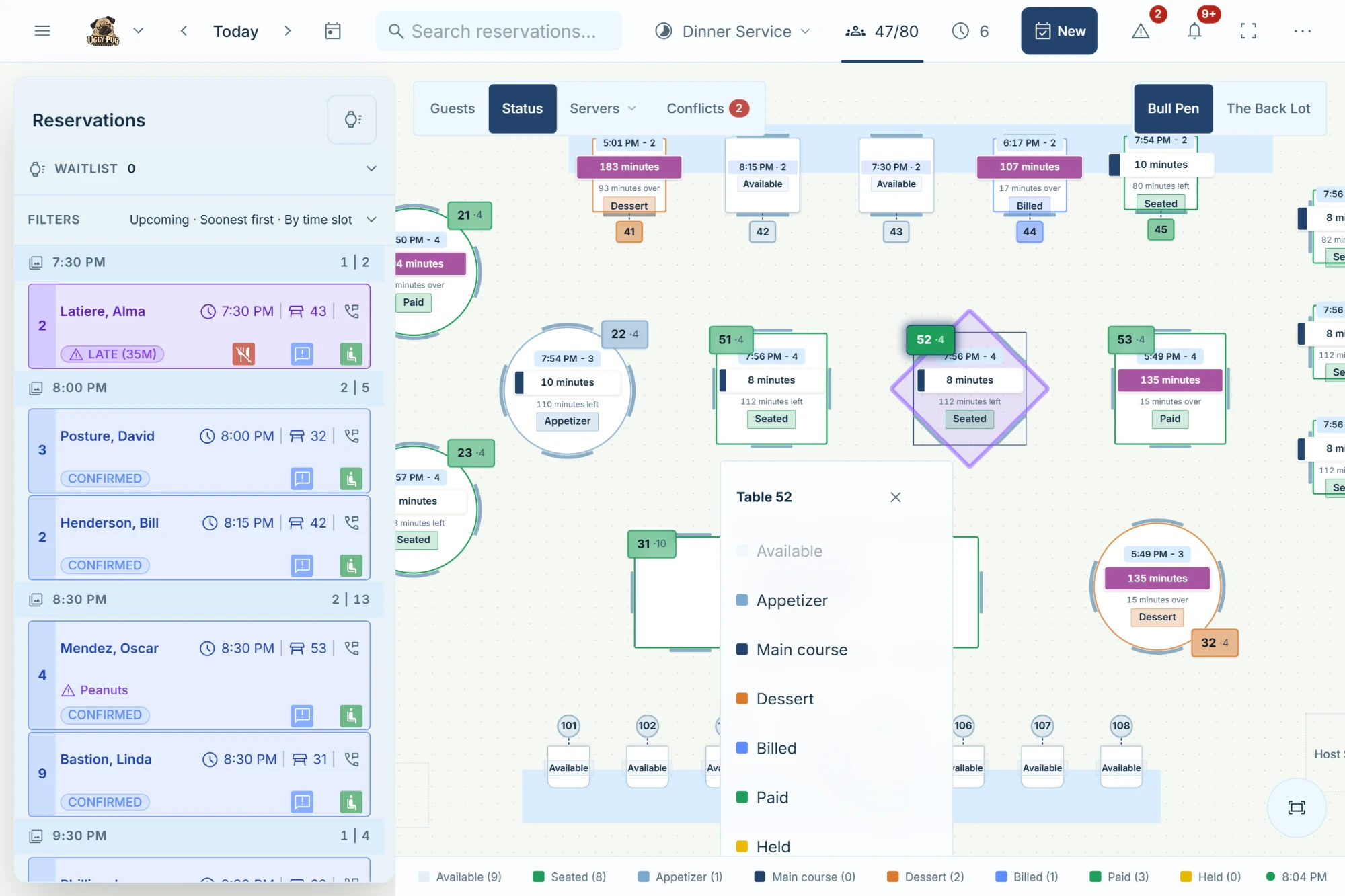
Every table carries capacity, position, combinations, section, current party, future bookings, turn state, and guest context. Hosts can act where they are already looking.
Drag a reservation onto a table, move a seated party, finish one party and seat the next in one step, or open the guest record straight from the floor.
Turn pressure, overlaps, tables that don't fit the party, late arrivals, and overloaded sections show up in context.
Table combinations, minimums, online eligibility, landmarks, multiple rooms, and server sections.
Schedule patio, holiday, event, and private-dining layouts by weekday, date, or service. Bookings are never silently unassigned when a layout changes.

Built for service
Designed around the room your team is actually running.
Hostbook keeps operational detail behind a clear interface, so staff can focus on the guest and the room.