
Big-league bookings. Neighborhood pricing.
Your restaurant’s not just a room. It’s a Storybook.
Hostbook is the reservation book, waitlist, and live floorplan for independent restaurants — so every guest’s story goes right, from the door to dessert.
Skip the intro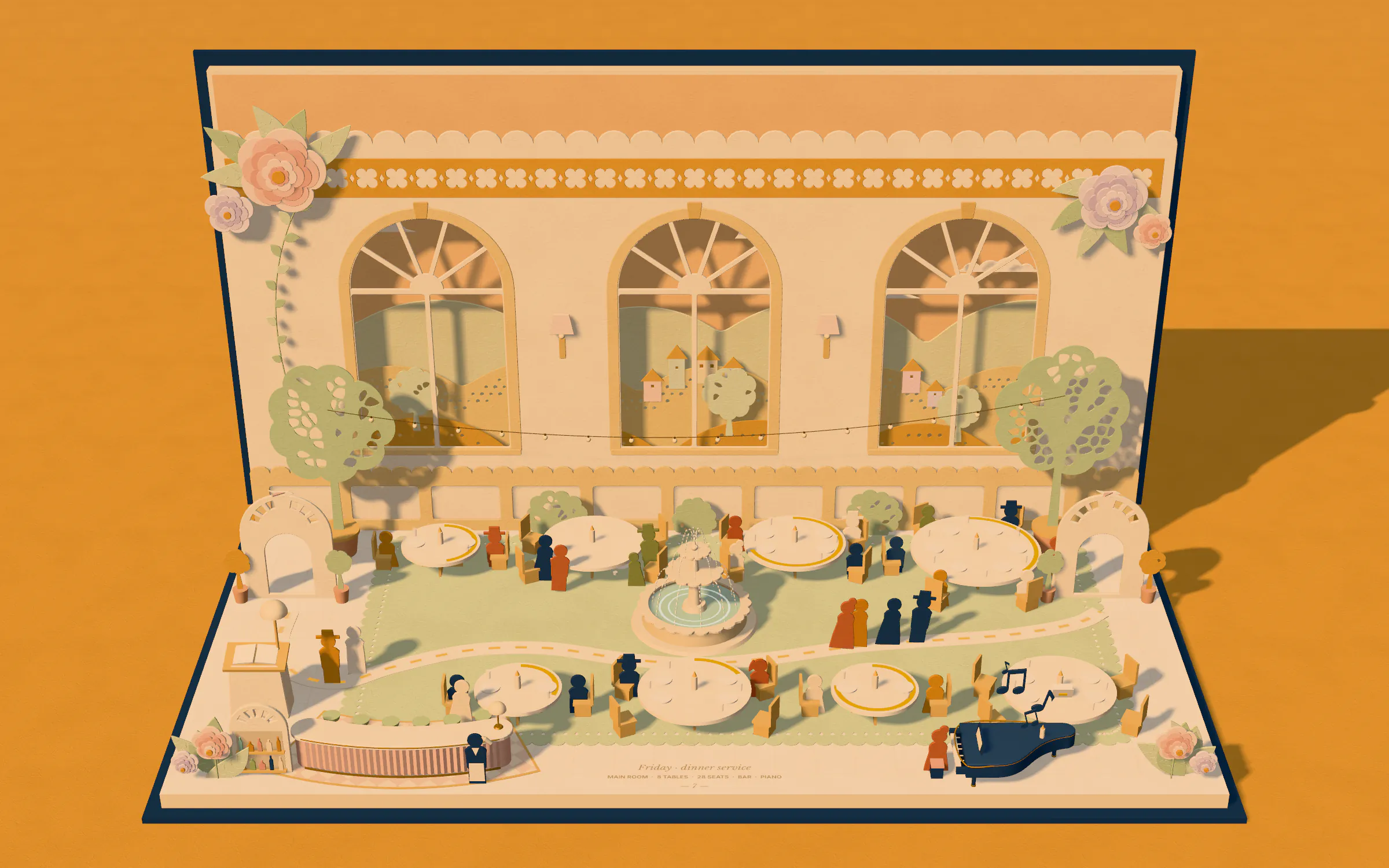
A closed Hostbook storybook stands on a golden table. As you scroll it lies down and opens into a paper pop-up restaurant where guests arrive at the host stand, flow along a ribbon to their tables, dine, and leave as each table is reset for the next party, while the evening turns from golden hour to night.
- Seated now
- 0covers
- Avg. wait
- 0sec
- Tables turned
- 0
Illustrative simulation, not customer data
Use the arrow keys to look around the room.Feature highlights
Powerful tools for every guest’s story.
From the first booking to the next visit, there’s a Hostbook tool for every chapter of the night.
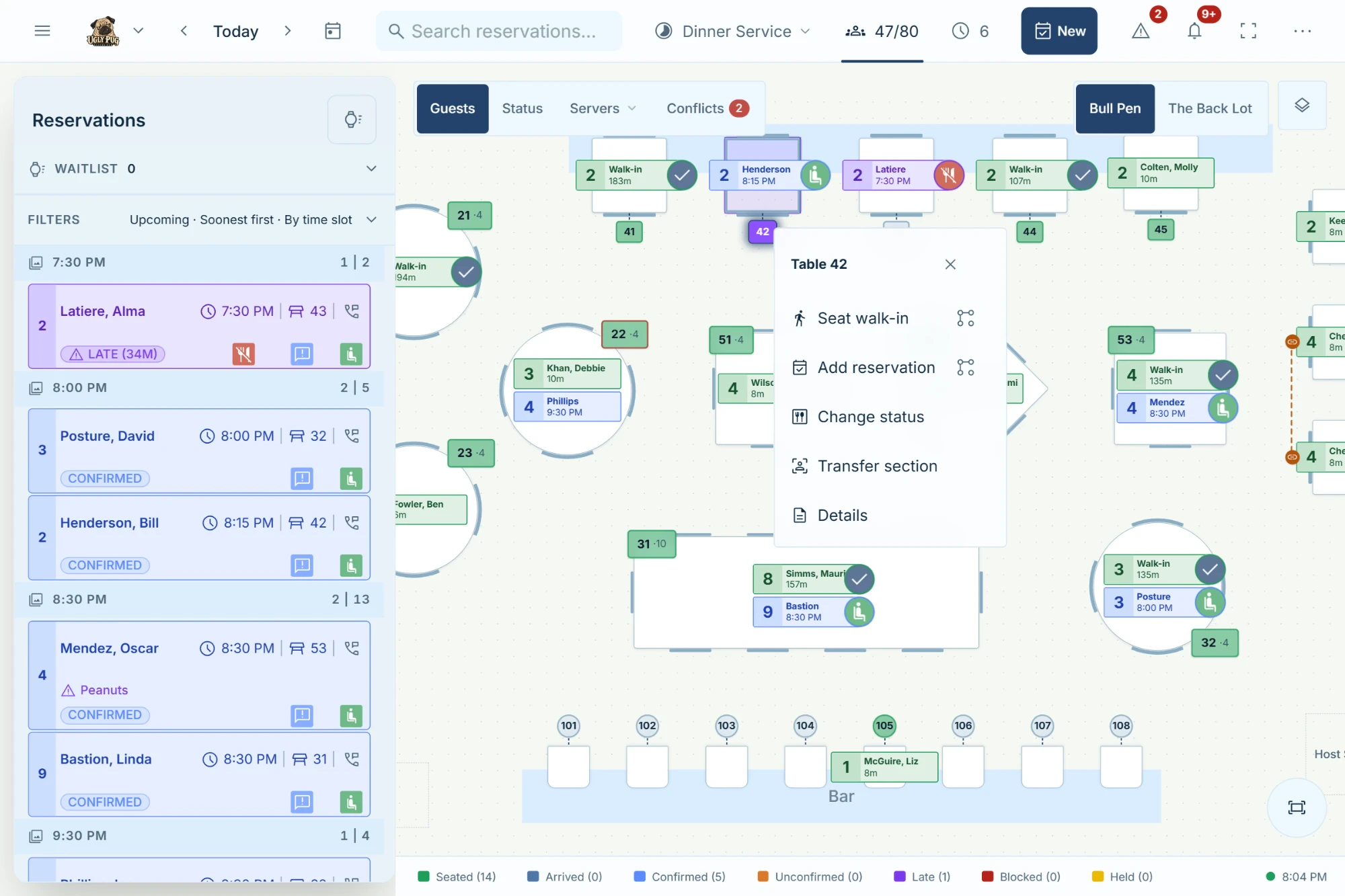
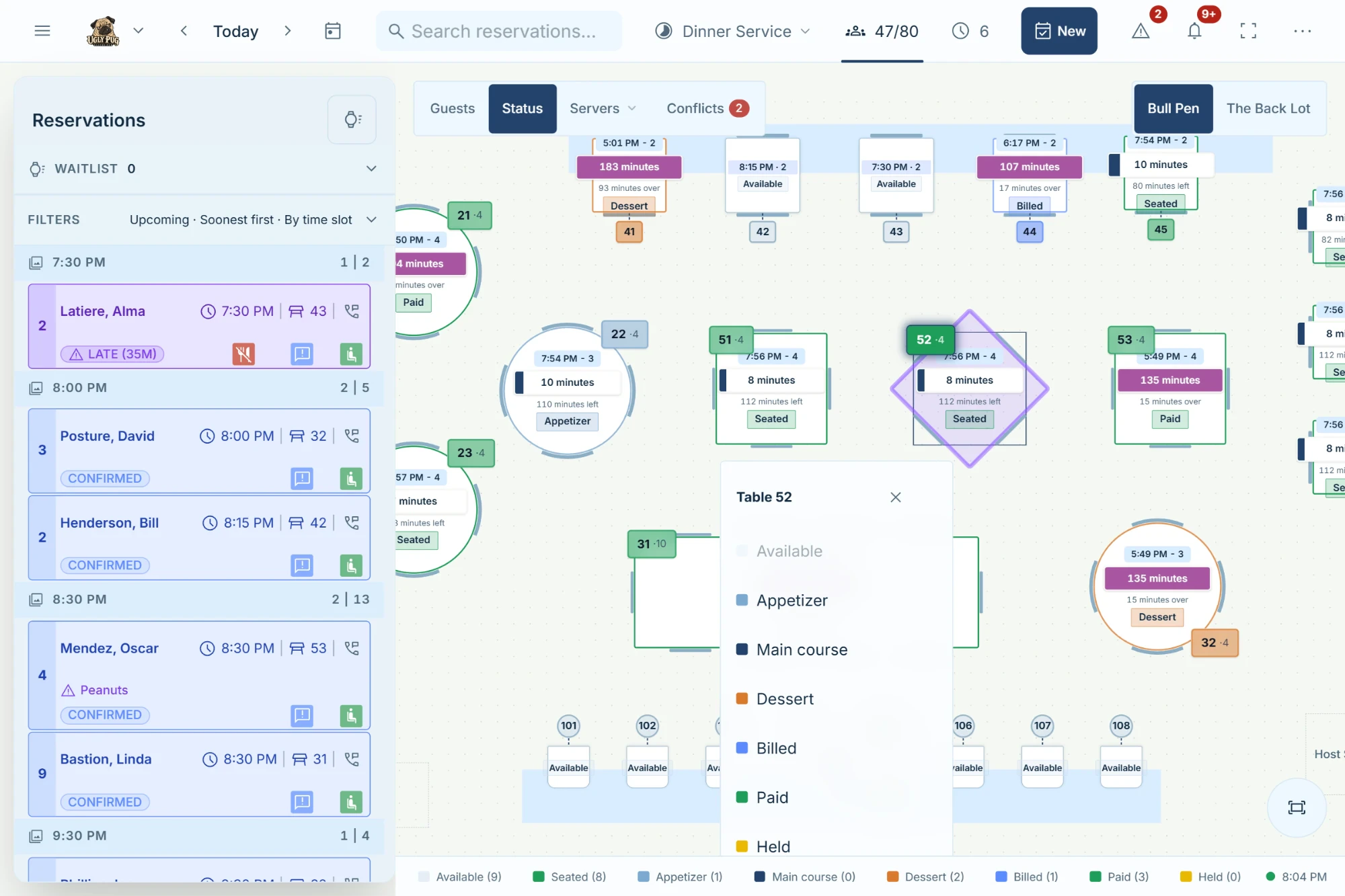
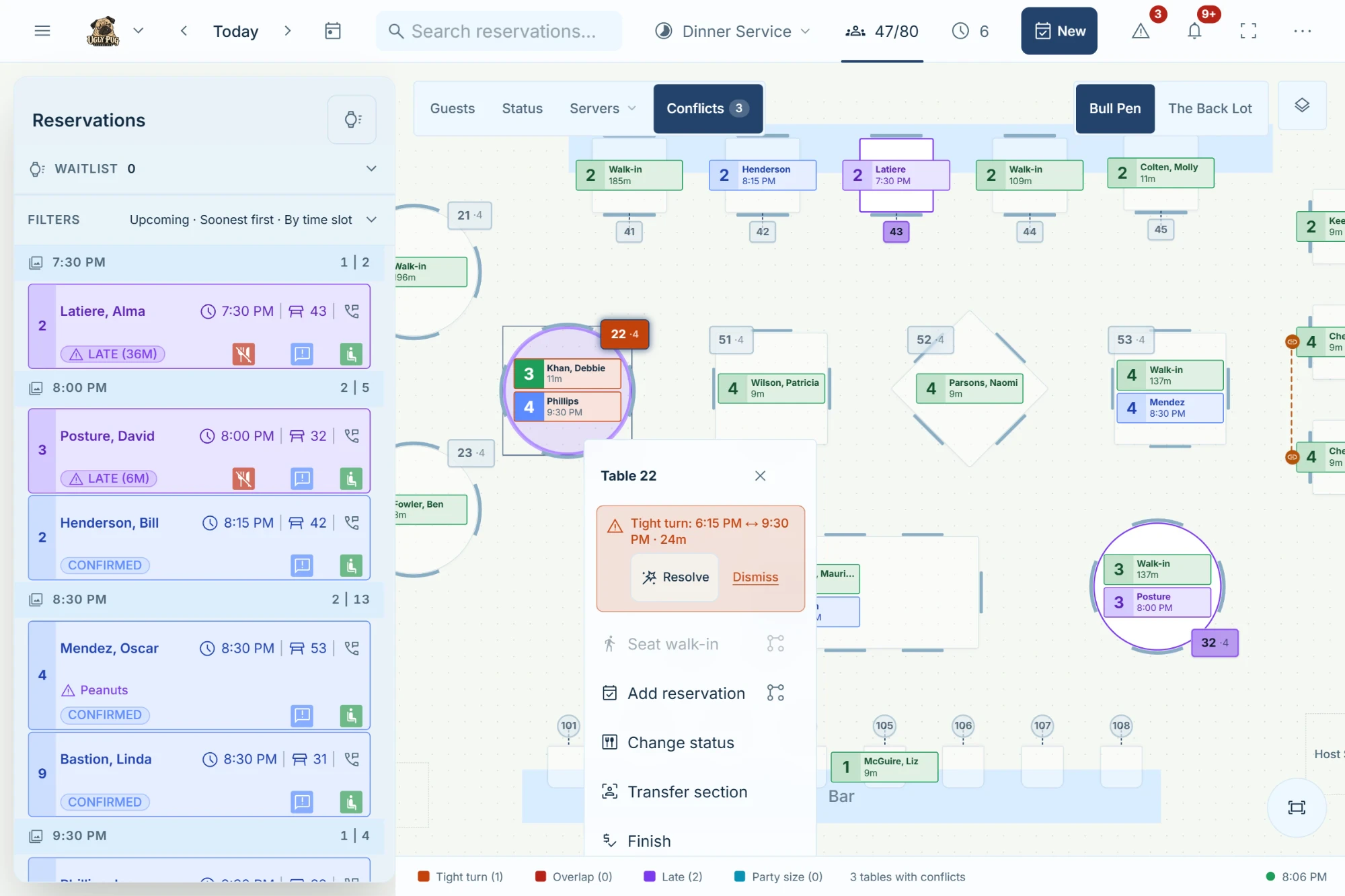
- The booking. Every story starts with a table that's really there. Hostbook books from your actual floor, so the time a guest picks is a time you can seat. In this chapter: Availability from real tables, turns, and pacing; A live floorplan beside the book, on every screen; Your own booking page and website widget; Card guarantees (coming soon).
- The arrival. No one's night should begin with a long, vague wait. Quote from the live floor, and seat guests the moment a table opens. In this chapter: Wait quotes from the live floor; An online waitlist that books the first opening; Table-ready messages, with the guest's consent; Walk-ins placed straight onto a table.
- The welcome. The best nights feel remembered. Allergies, occasions, and past visits are at the table before the guest is. In this chapter: Allergies, preferences, and visit history; Named birthdays and anniversaries; Families on one phone kept as separate guests; Alerts for VIPs, allergies, and large parties.
- The celebration. Wine dinners, private parties, holiday seatings: events that fill the room, planned on the same floor as dinner service. In this chapter: Public event pages or members-only invitations; Invitations and RSVPs with dietary details; QR check-in at the door; Ticket and package pre-sales (coming soon).
- The next visit. A good story brings guests back. Stay in touch with news, events, and invitations your regulars actually want. In this chapter: A mailing list that grows from your booking page; Email announcements and event spotlights; Members-only events for your regulars; Reviews after each visit, answered by email.
- Behind the scenes. Help that stays out of the way: AI proposes, your team decides, and nothing on the floor changes until you apply it. In this chapter: Seating, section and pacing suggestions on request; Every suggestion checked against your rules; One PIN to apply, one step to undo; Help-center answers from an AI assistant.

Hostbook
Every guest’s story, in one book.
Point at a bookmark to turn to its chapter.Tap a bookmark to turn to its chapter.
Chapter 1 · The booking
Floorplan-first reservations
Every story starts with a table that's really there. Hostbook books from your actual floor, so the time a guest picks is a time you can seat.
4
Chapter 2 · The arrival
Waitlist & walk-ins
No one's night should begin with a long, vague wait. Quote from the live floor, and seat guests the moment a table opens.
12
Chapter 3 · The welcome
Guest memory
The best nights feel remembered. Allergies, occasions, and past visits are at the table before the guest is.
20
Chapter 4 · The celebration
In-house events
Wine dinners, private parties, holiday seatings: events that fill the room, planned on the same floor as dinner service.
28
Chapter 5 · The next visit
Promotions & marketing
A good story brings guests back. Stay in touch with news, events, and invitations your regulars actually want.
36
Chapter 6 · Behind the scenes
AI that asks first
Help that stays out of the way: AI proposes, your team decides, and nothing on the floor changes until you apply it.
44
Contents
- Floorplan-first reservations4
- Waitlist & walk-ins12
- Guest memory20
- In-house events28
- Promotions & marketing36
- AI that asks first44
In this chapter
- Availability from real tables, turns, and pacing
- A live floorplan beside the book, on every screen
- Your own booking page and website widget
- Card guaranteesComing soon
5
In this chapter
- Wait quotes from the live floor
- An online waitlist that books the first opening
- Table-ready messages, with the guest's consent
- Walk-ins placed straight onto a table
13
In this chapter
- Allergies, preferences, and visit history
- Named birthdays and anniversaries
- Families on one phone kept as separate guests
- Alerts for VIPs, allergies, and large parties
21
In this chapter
- Public event pages or members-only invitations
- Invitations and RSVPs with dietary details
- QR check-in at the door
- Ticket and package pre-salesComing soon
29
In this chapter
- A mailing list that grows from your booking page
- Email announcements and event spotlights
- Members-only events for your regulars
- Reviews after each visit, answered by email
37
In this chapter
- Seating, section and pacing suggestions on request
- Every suggestion checked against your rules
- One PIN to apply, one step to undo
- Help-center answers from an AI assistant
45
Runs in the browser on your host-stand iPad, office laptop, and phone — always in sync. No special hardware.
AI Host
Ask in plain words. Keep the final say.
Unavailable on the free plan
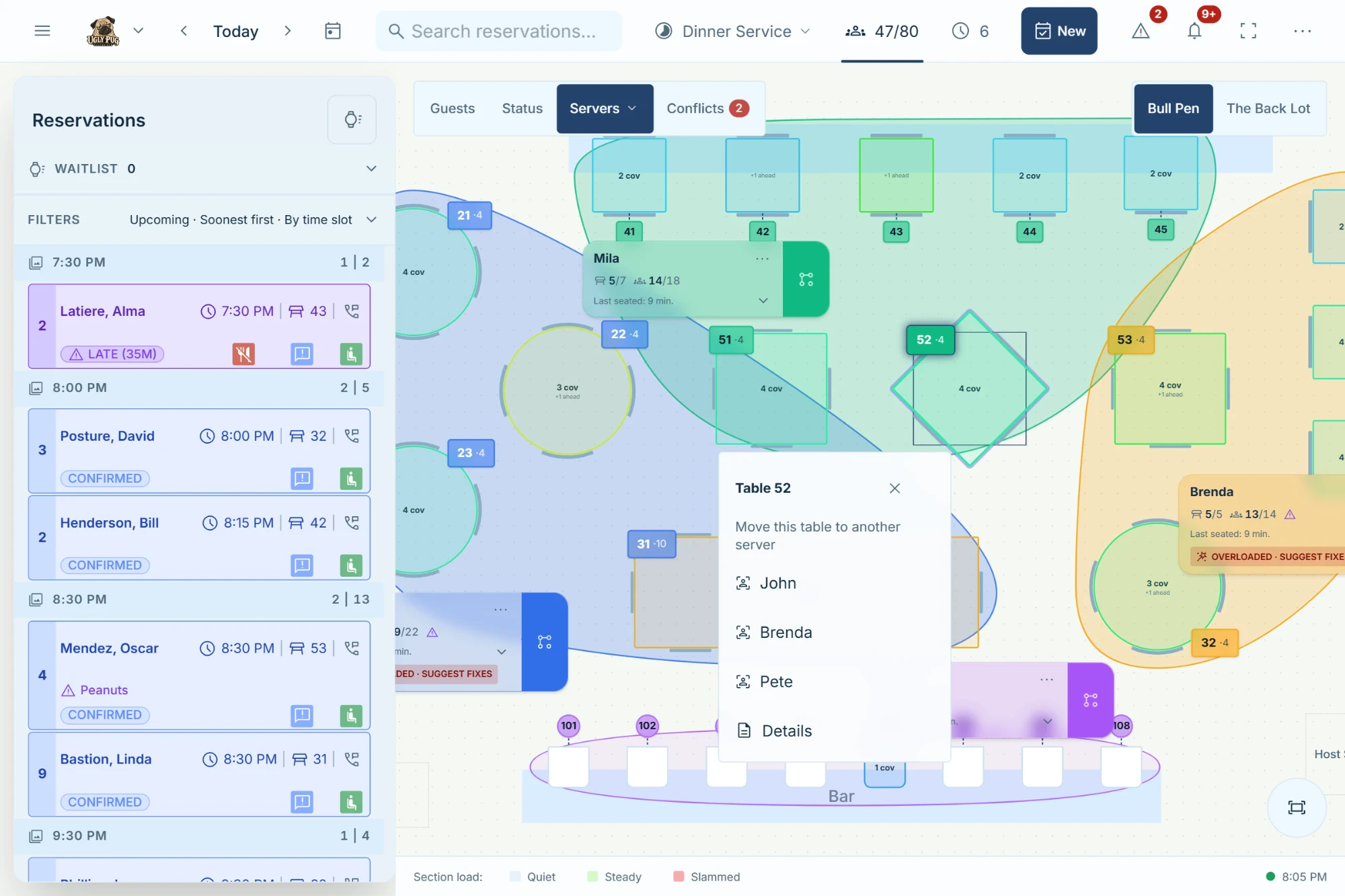
Type what the night needs: a table for eight, a lighter section for a busy server, calmer online pacing. AI Host reads it, Hostbook works out the changes on your real floor, you choose which to apply, and one step undoes them.
Plain words, checked moves
The AI only reads the request. Hostbook finds and checks every option against your tables, combinations, and dining times.
It makes room
It can free a table combination by moving parties who haven’t been seated yet. Seated and locked parties never move, and start times never change.
Or skip the typing
Find a table on a new booking, Resolve on an overlapping table, and Suggest fixes on a busy server’s card, one tap each.
Guest names stay on the device
Names are taken out before a request is sent, so the AI never sees them.
Events & marketing
Invite them in. Bring them back.
Unavailable on the free plan
Special Events puts wine dinners, private parties, and holiday seatings on your real floor. Member emails fill them from your own list, and reviews tell you how the night went.
Grow your own list
Guests opt in when they book online or on your signup page, and the list you already have comes in by CSV.
Invite your members
Publishing an event emails every member a personal invitation. In between, send announcements with your own images and buttons, now or scheduled.
Hold the tables, run the door
Seats come from the tables you set aside, which leave regular booking. RSVPs can ask about dietary needs and allergies, and one QR scan checks in the whole party.
Ticket and package pre-salesComing soon
Hear how it went
After the visit, guests get a private link to rate the food, service, and ambience. Reply by email, right from Hostbook.
Illustration · sample data
Pricing is coming soon.
Plans are being finalized. What won’t change is how Hostbook treats your restaurant.
We’ll email you when plans are announced.
- Free plan to startStart on a free plan with no monthly fee.
- No per-cover feesYou are never charged per guest, and never more because of where a booking came from.
- No contractsMonth to month. Cancel anytime.
- Your guest data stays yoursNo marketplace and no diner network. Export your guests and reservations anytime.
Switch without the scramble
Switch without losing the story so far.
Bring your history
Export
Download your guests and reservations from OpenTable, Resy, Resos, Tock, SevenRooms, or any system that exports CSV. The setup checklist links each export guide.
Map
Hostbook suggests how your columns line up, and you confirm before anything is written.
Review
Problem rows and likely duplicates are flagged, so you decide what to keep.
Go live
Point your Reserve button at your Hostbook page, and keep the old link as a fallback while you switch.
Set up on your own schedule
- A setup wizard for your venue, rooms, services, floorplan, and staff PINs.
- In-app help and walkthroughs on the screens you use.
- An AI help assistant that answers from the Hostbook help center.
- A help center written in plain restaurant language.
An honest fit
Is Hostbook right for your restaurant?
Built for
- Independent, full-service restaurants with one to three locations
- Seasonal venues that open and close with the calendar
- Rooms with busy walk-in and waitlist nights
- Private dining and ticketed dinners
- Teams that share one host-stand tablet
Not yet
- POS integrations such as Toast or Square
- Reserve with Google
- Native iOS and Android apps — Hostbook is an installable web app
- Reporting across multiple locations
- Venues outside the United States and Canada
FAQ
Questions, answered.
The practical details owners and managers ask about before switching.
Browse the help centerWhat does Hostbook replace?
Your reservation book, waitlist, floorplan whiteboard, and guest notes — plus event RSVPs and your email list if you use Special Events and member emails. Online booking, the live floorplan, and every guest's history share one real-time system.
How much does Hostbook cost?
Pricing is coming soon. There will be a free plan to start, no per-cover fees, and no contracts. Request early access and we'll email you when plans are announced.
Are there contracts?
No. Hostbook is month to month, and you can cancel anytime.
Who owns our guest data?
You do. Hostbook has no marketplace or diner network, and you can export your guests and reservations anytime.
What hardware do we need?
Any modern browser: the iPad or tablet at your host stand, a laptop in the office, and your phone. Hostbook installs like an app and stays in sync on every screen. There's no special hardware to buy.
What happens if the internet drops?
Your reservation book stays on screen, and new reservations can still be taken. They save on the device and sync when the connection returns, with any conflicts flagged for review. Seating and status changes need a connection.
Can we switch from our current system?
Yes. Export your guests and reservations from OpenTable, Resy, Resos, Tock, and SevenRooms or any system that exports CSV files. Hostbook suggests how to map the columns, flags problem rows and duplicates for review, and imports the rest.
How does setup work?
It's self-serve. A setup wizard walks you through your venue, rooms, services, floorplan, and staff PINs, with step-by-step guides, in-app help, and an AI help assistant along the way.
Do guests need an app or an account?
No. Guests book on your branded page, then change or cancel from their confirmation link. They can turn on push notifications without installing anything.
Do you send text messages?
Email confirmations are included. Text messages go out only with the guest's consent, to numbers in the United States and Canada.
Can guests guarantee a booking with a card?
Coming soon: guests save a card when they book, charged only for a late cancel or no-show after a manager reviews it the next morning, paid into your restaurant's own Stripe account.
Do you integrate with our POS or Reserve with Google?
Not yet. You can add your Hostbook booking link to your website, Instagram, and Google Business Profile today.
Where is Hostbook available?
In the United States and Canada.
How do we get access?
Request early access and we'll email you when your spot opens.
Start your next chapter.
Request early access and we'll email you when your spot opens.